Intro to Database Systems CMU 15-445/645#
Overview#
Things that go here can include:
- Question trying to answer
- Success criteria
- Current state (high level view of what’s next)
Lessons Learned#
Resources#
Course Slides#
Project Plan#
{
"name": "Intro to Database Systems CMU 15-445/645",
"filter": "@15-445"
}
Designs#
Questions#
Lecture Notes#
Note: From these, create project learnings -> evergreens
01 - Course Introduction and Relational Model#
Slides Database - an organized collection of inter-related data that models some aspect of the real world
Database Example#
Let’s say we want to model a digital music store to keep track of artists and albums. We need info about artists, and what albums they released.
Let’s say we store a database as CSV files that we manage in code. Separate file per entity, app must parse files whenever they want to read or update records. Parsing this would be something like:
for line in file:
    record = parse(line)  # Assume parse function splits line by line, etc
    if "Ice Cube" == record[0]:
        print int(record[1])
Problems#
Data integrity#
how can we ensure the artist is the same for each album entry? What if album year is overwritten by invalid string? What if an artist changes their name? How do we store multiple artists for an album?
Implementation#
How do you find a record? Example code does not scale with more records at all. What if I want to create an application with different tech using the same database? Now parsing code needs to be rewritten in new target language.
Durability#
What if machine crashes while updating a record? What if we want to replicate database for high availability?
Database Management System#
Because of above problems, you want to offload parsing and data management logic into the Database Management System. A general-purpose DBMS allows the definition, creation, querying, updating, and admin of databases.
Databases are a unique class of software that are incredibly important to computing.
Early DBMSs#
The first one came online in 1965 at GE. In the early days, (60s-70s) the way to do things was not obvious. In the late 60s, Ted Codd (Edgar Codd) at IBM noticed people spent time rewriting DB application. This was because of a tight coupling between logical and physical layers, e.g. if you want to change your data structure being stored from a map to a tree. You also needed to know what queries the application would execute before deploying the database.
Edgar Codd introduced the relational data model in 1970. Three key concepts: 1. Store database in simple data structures as relations 2. Access data and relations through a high-level language 3. Physical storage should be left up to implementation This was controversial, people thought that a machine couldn’t plan a query as well as a human could.
Data Models#
A data model is a collection of concepts for describing the data in a database (high level - conceptual), while a schema is a description of a particular collection of data, using a given data model (more implementation).
Some data models:
- relational
- key-value
- graph
- document
- column-family
- array/matrix
- Notably used in machine learning. Databases implementing this model are rare
- hierarchical
- obsolete/rare
- network
- obsolete/rare
Relational Model#
Three parts:
- Structure - definition of relations and contents
- Integrity - ensure DB’s contents satisfy constraints
- Manipulation - how to access and modify DB contents
A relation is an unordered set that contains the relationship of attributes that represent entities. A tuple is a set of attribute values in the relation - these can be thought of as rows, but row has a specific implementation-dependent definition. AKA the relation’s domain. Values tend to be atomic/scalar (especially in Edgar Codd’s original paper).
An n-ary relation is a table with n columns.
A relation’s primary key is an attribute or set of attributes that u niquely identifies a single tuple. Some DBMSs automatically create an internal primary key if you don’t define one. A foreign key is a way to specify that an attribute from one relation has to map to a tuple in another relation.
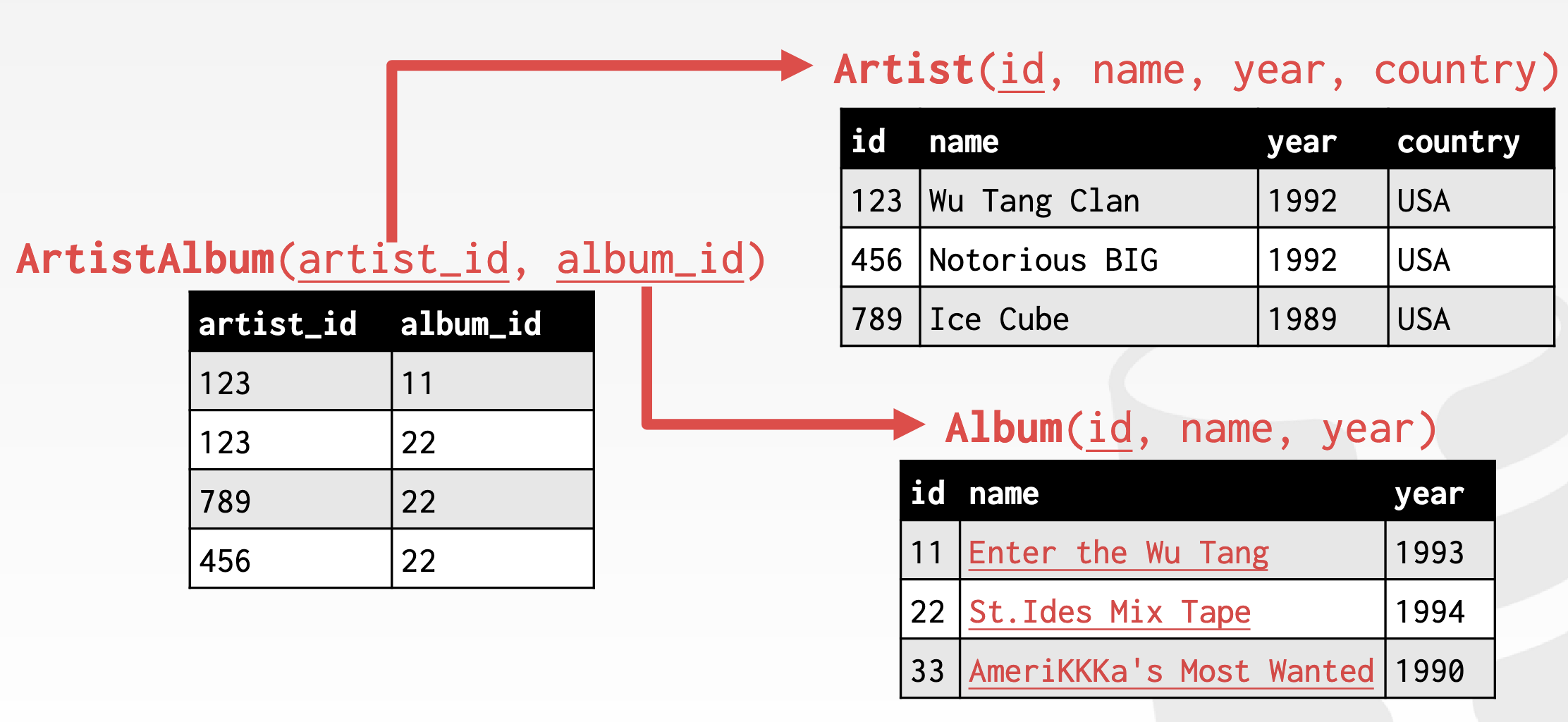
An example of this is an ArtistAlbum relationship table, which connects the artist ID to the album ID, rather than having the artist ID directly on the album (which prevents you from storing multiple artists on the same album and allows you to insert albums with artists that don’t exist)
Data Manipulation Languages (DML)#
Two approaches:
- Procedural - query specifies high-level strategy of how the DBMS should find the desired result. Example: § Relational Algebra
- Non-procedural - the query specifies only what data is wanted and not how to find it. Example: relational calculus
Relational Algebra#
These are the fundamental operations to retrieve and manipulate tuples in a relation and are based on set algebra. Note: SQL does not rely on sets even though it uses set algebra.
Each operator takes one or more relation as input and outputs a new relation. You can chain operators together to create more complex operations.
| Symbol | Meaning |
|---|---|
| σ | select |
| π | projection |
| U | union |
| ∩ | intersection |
| – | difference |
| x | product |
| ⨝ | join |
Select#
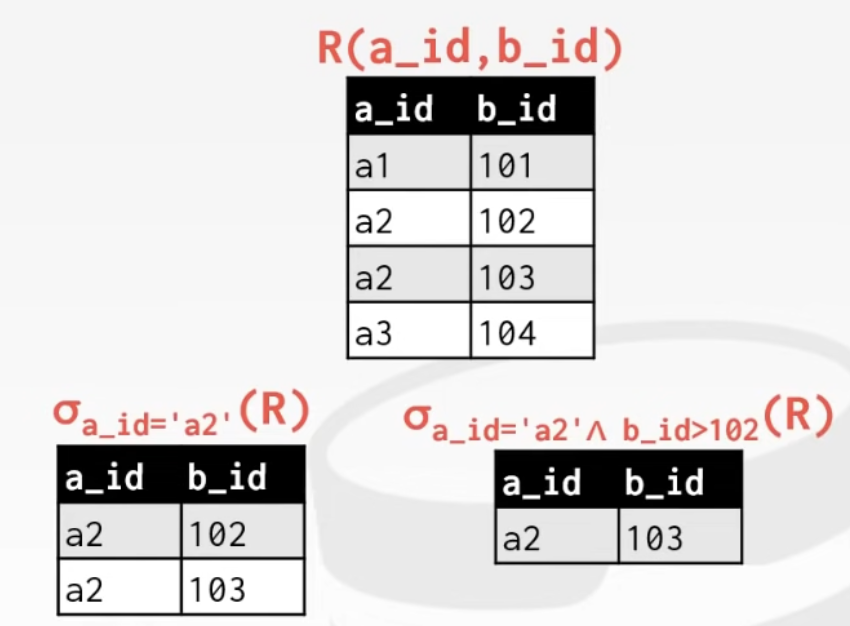
Choose a subset of the tuples from a relation that satisfies a selection predicate
The predicate acts as a filter to retain only tuples that fulfill its requirement. Multiple predicates can be combined by using conjunctions/disjunctions.
Syntax: $\sigma_{predicate}(R)$
 In SQL:
SELECT * FROM R
 WHERE a_id='ad' AND b_id>102;
Projection#
Generate a relation with tuples that contain only specified attributes. You can rearrange the attributes’ ordering and manipulate the values as well.
Syntax: $\pi_{A1, A2, \ldots,An}(R)$
 In SQL:
SELECT b_id-100, a_id
  FROM R WHERE a_d = 'a2';
Union#
Take two relations and produce a new output relation that contains all tuples that appear in either only one or both input relations.
Syntax: $\lparen R \cup S \rparen$
 In SQL:
(SELECT * FROM R)
UNION ALL
(SELECT * FROM S);
Intersection#
Generate a relation that contains only the tuples that appear in both input relations
Syntax: $\lparen R \cap S \rparen$
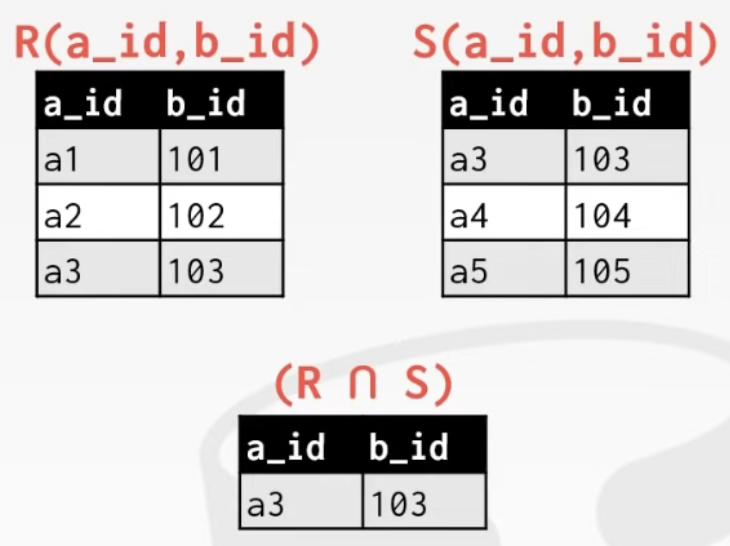 In SQL:
(SELECT * FROM R)
INTERSECT
(SELECT * FROM S);
Difference#
Generate a relation that contains only tuples that appear in first but not second of input relations.
Syntax: $\lparen R-S \rparen$
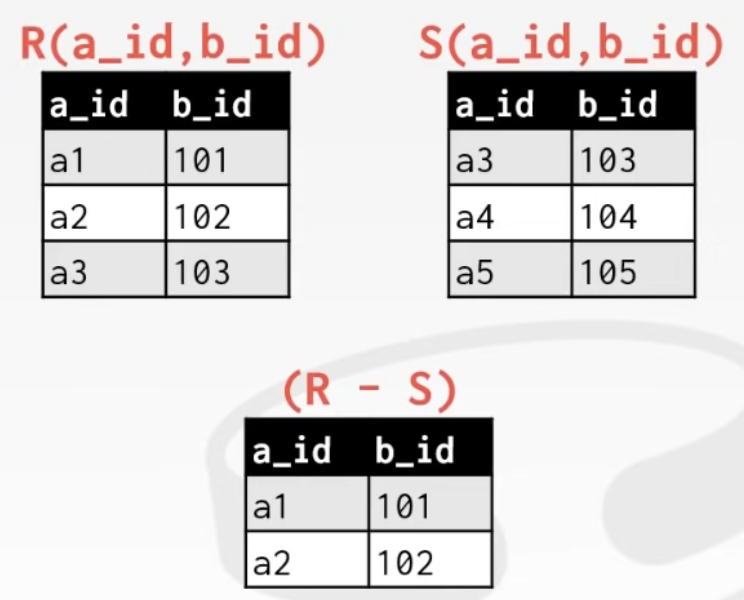 In SQL:
(SELECT * FROM R)
EXCEPT
(SELECT * FROM S);
Product#
Generate a relation that contains all possible combinations of tupes from input relations.
Syntax: $\lparen R \times S \rparen$
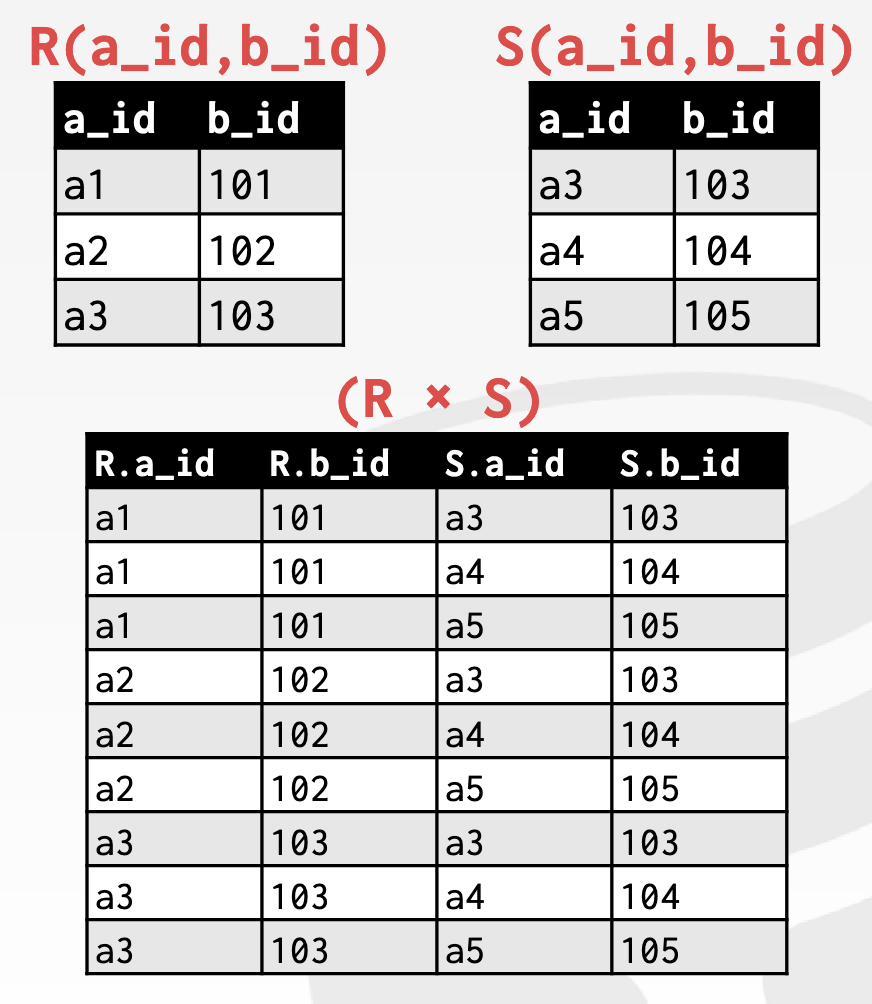 In SQL
SELECT * FROM R CROSS JOIN S;
SELECT * FROM R, S;
Note: You’ll generally not want to do this outside of testing.
Join#
This is explicitly a natural join. This generates a relation that contains all tuples that are a combination of two tuples (one from each input relation) with a common value(s) for one or more attributes.
Syntax: $\lparen R \bowtie S \rparen$
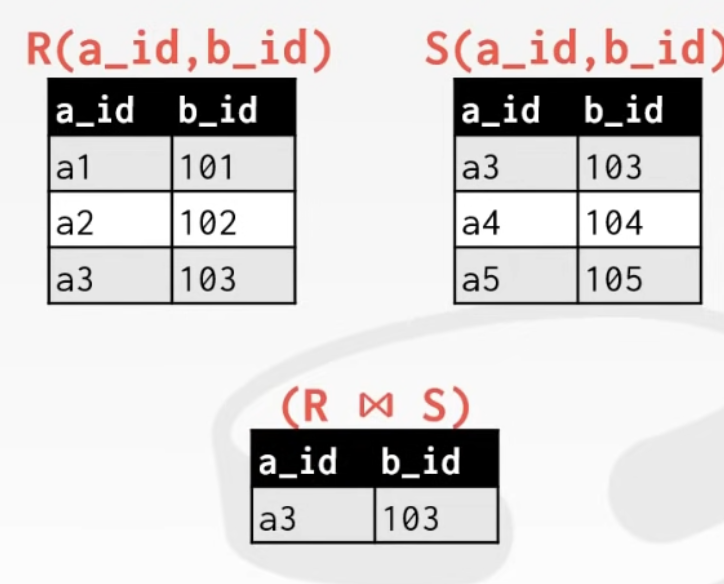 In SQL
SELECT * FROM R NATURAL JOIN S;
Relational algebra degines the high-level steps of how to compute a query, but a better approach would be to state the high-level answer that you want the DBMS to compute.
Relational Model: Queries#
The relational model is independent of any query language implementation, and SQL is the de facto standard. SQL allows us to write high-level queries that will still get our data if the underlying database or anything else changes.
02 - Advanced SQL#
Slides Query optimizer - re-orders operations and generates query plan Original name of SQL was SEQUEL (Structured English Query Language) from IBM’s System R prototype
SQL because ANSI Standard in 1987, ISO in 1989
Current standard is SQL:2016 (as of 2018). SQL isn’t a dead language! If you claim to support SQL, the bare minimum is to support SQL-92 standard.
SQL is a collection of the following:
- Data Manipulation Language (DML)
- Data Definition Language (DDL)
- Data Control Language (DCL)
SQL is based on bag algebra (list - ordered and can have duplicates), not set algebra (no dupes)
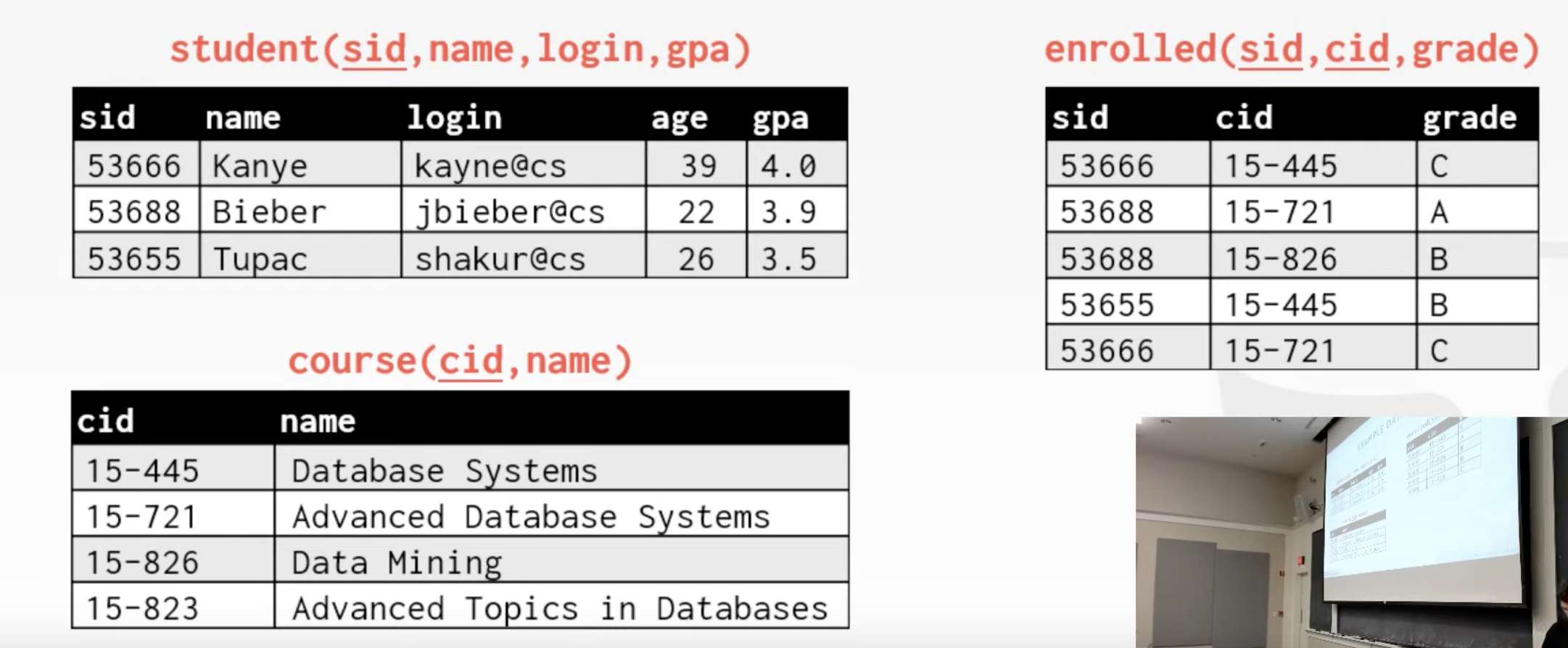
Example Database for This Lecture#
Aggregates#
Functions that return a single value from a bag of tuples. These can only appear in output of SELECT statements.
Output of other columns outside of an aggregate is undefined. Aggregates only return a single result, while a column could have multiple results. Some systems will pick a single value from the column to return (like mysql or sqlite).
Examples#
AVG(col) -> return average col value MIN(col) -> return lowest value from col
- Get # of students with a “@cs” login:
SELECT COUNT(login) AS CNT FROM student WHERE login LIKE '%@cs'equivalent toSELECT COUNT(1) AS cnt FROM student WHERE login LIKE '%@cs'since you want to add 1 for every login. Depending on the system, there could be performance consequences.
Multiple Aggregates#
Separate with comma in SELECT, you will get a result column for each answer
SELECT AVG(gpa), COUNT(sid)
  FROM student WHERE login LIKE '%@cs'
Distinct Aggregates#
DISTINCT in some aggregate functions (COUNT, SUM, AVG) will get you the answer based on unique rows
SELECT COUNT(DISTINCT login)
  FROM student WHERE login LIKE '%@cs'
Group By#
Project tuples into subsets and calculate aggregates against each subset.
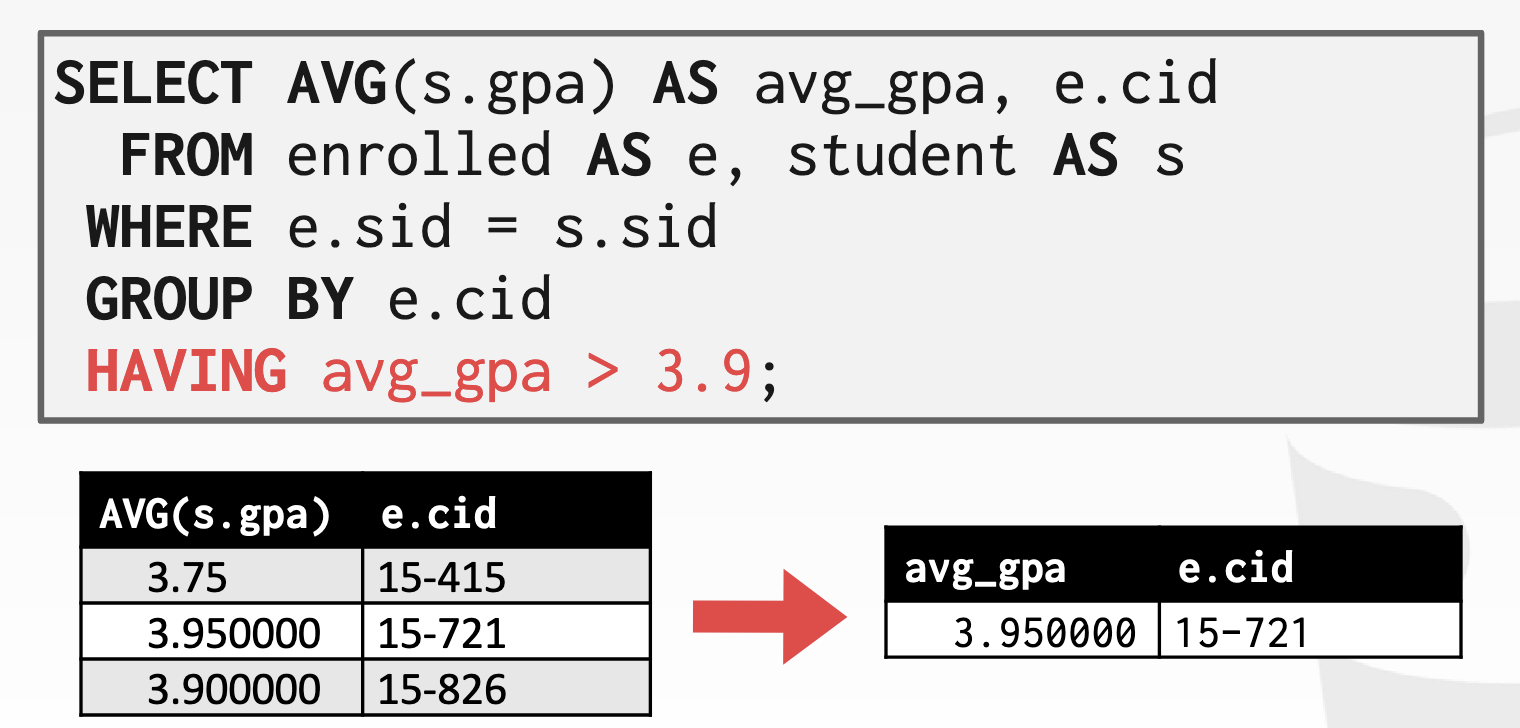
Having#
This filters results based on aggregation computation, like having a WHERE clause for a GROUP BY.
SELECT AVG(s.gpa) AS avg_gpa, e.cid
  FROM entrolled AS e, student AS s
WHERE e.sid = s.sid
GROUP BY e.cid
HAVING avg_gpa > 3.9
String Operations#
In most systems, strings are case sensitive and only support single quotes. SQLite allows double quotes, MySQL allows double quotes and is case insensitive (so no need to use UPPER()).
LIKE is used for string matching. '%' matches any substring including empty strings, _ matches any one character.
SELECT * FROM enrolled AS e
  WHERE e.cid LIKE '15-%'
SELECT * FROM student AS s
  WHERE s.login LIKE '%@c_'
String Functions can be used in either output or predicates.
SQL standard says to use || operator to concatenate two or more strings together. But some systems may have + (MSSQL Server), CONCAT(), etc.
Date/Time Operations#
Support and syntax varies wildly.
Output Redirection#
Store query results in another table. INTO or CREATE TABLE to create a new table on the fly.
INSERT INTO must generate same columns as target table.
INSERT INTO CourseIds
(SELECT DISTINCT cid FROM enrollment)
Output Control#
ORDER BY <column*> [ASC|DESC]
SELECT sid FROM entrolled
  WHERE cid = '15-721'
  ORDER BY grade DESC, sid ASC
LIMIT <count> [offset]
Limit # of tuples returned in output. Offset allows you to do a “range”
SELECT sid, name FROM student
  WHERE login LIKE '%@cs'
  LIMIT 20 OFFSET 10
Nested Queries#
43:53